
Kaveri Online Services – Login, Registration, EC Download & Property Registration
Buying, selling, or verifying property in Karnataka has become significantly easier with Kaveri Online Services, the official digital platform developed by the Department of Stamps and Registration, Government of Karnataka. The portal enables citizens to access a wide range of property-related services online without making repeated visits to the Sub-Registrar Office.
Through the Kaveri Online Services Portal , users can access property registration, Encumbrance Certificate (EC) Download, Guidance Value Search, Stamp Duty Calculation, Certified Copy requests, Appointment Booking, and several other essential services. While most applications can be completed online, only selected services require physical verification at the Sub-Registrar Office.
Whether you are a homebuyer, landowner, investor, advocate, or property consultant, Kaveri Online Services provides a faster, more transparent, and convenient way to manage property-related activities across Karnataka.
Important Information
Always use the official Kaveri Online Services Portal to access property registration, EC Download, Guidance Value, Stamp Duty calculation, and other government services. Avoid unofficial websites that may provide inaccurate or outdated information.
Popular Online Services
Overview
What is Kaveri Online Services?
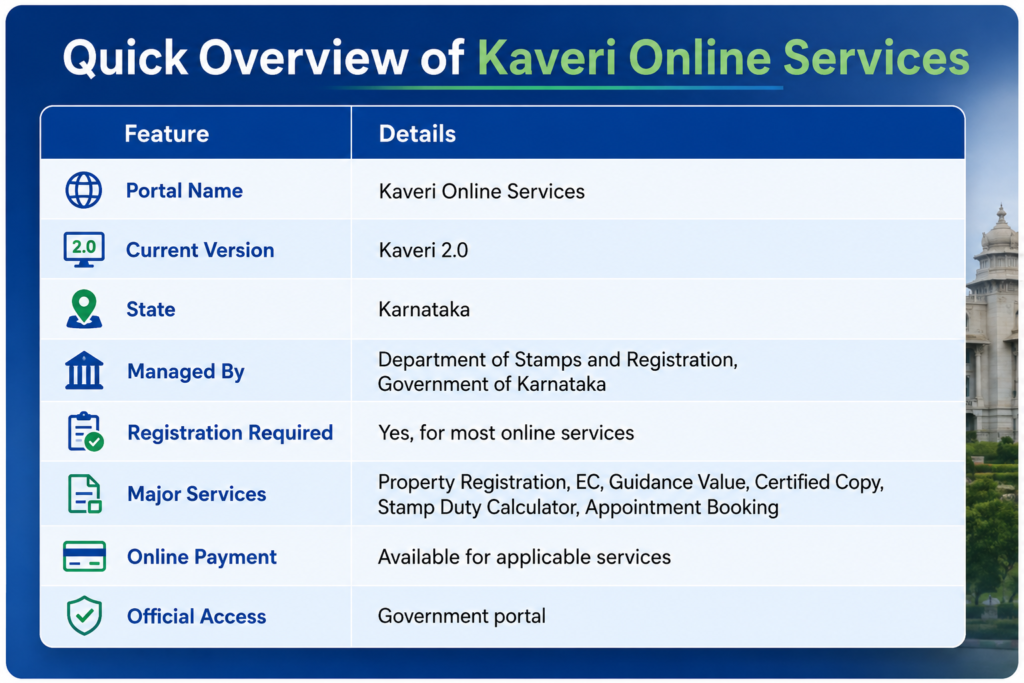
Kaveri Online Services is the official digital property registration platform developed by the Department of Stamps and Registration, Government of Karnataka. The portal enables citizens to access essential property-related services online, reducing paperwork and minimizing visits to the Sub-Registrar Office.
The upgraded Kaveri Online Services 2.0 offers a faster and more user-friendly experience. After creating an account, users can download Encumbrance Certificates (EC), estimate stamp duty, search guidance values, request certified copies, book appointments, and track applications through a single secure platform.
By digitizing these services, the Karnataka Government has made property registration more transparent, efficient, and convenient for homebuyers, landowners, investors, advocates, and other stakeholders across the state.
💡 Why It Matters
Kaveri Online Services simplifies property registration by bringing multiple government services together on one platform, allowing users to save time, improve transparency, and complete property-related tasks more efficiently.
Portal Highlights
Key Features & Services Available on Kaveri Online Services
The Kaveri Online Services Portal offers a comprehensive range of digital property services through a single platform. Users can access property registration, document verification, valuation tools, Encumbrance Certificates, certified copies, and many other services without unnecessary visits to the Sub-Registrar Office.
Kaveri Online EC
View property transaction history and download the Encumbrance Certificate (EC) online whenever it is available.
Property Registration
Begin online registration for sale deeds, gift deeds, lease deeds, partition deeds, and other property documents.
Stamp Duty & Valuation
Calculate estimated stamp duty, registration fees, and property valuation before registration.
Guidance Value Search
Search government-approved guidance values and estimate the market value of land or property.
Certified Copy Services
Request certified copies of registered property documents and monitor application progress online through the Department of Stamps and Registration.
Appointment Booking
Book appointments with the Sub-Registrar Office for document verification and property registration.
Application Tracking
Track the real-time status of your submitted applications directly through your Kaveri account.
Online Payments & e-Stamping
Pay stamp duty, registration charges, and other applicable fees securely using supported online payment options.
Why These Services Matter
By bringing multiple property-related services together on one secure digital platform, Kaveri Online Services reduces paperwork, improves transparency, speeds up property transactions, and enables citizens to manage registration, document verification, and property records more efficiently from anywhere in Karnataka.
Why Use Kaveri Online Services?
Kaveri Online Services provides secure digital access to property registration and document management services. Citizens can complete multiple property-related tasks online, reducing paperwork, improving transparency, and saving valuable time.
Benefits of Using Kaveri Online Services
Complete property-related services online from anywhere in Karnataka.
Reduce unnecessary visits to the Sub-Registrar Office and save time.
Access multiple government property services through one secure portal.
Track application status in real time after submitting requests.
Make secure online payments for registration and related services.
Download Kaveri Online EC records and other important documents anytime.
Enjoy a transparent, faster, and more convenient property registration process.
Register & Login on Kaveri Online
Create an Account
Visit the official portal, choose New User Registration, enter your personal details, verify your mobile number using OTP, and complete registration.
Login to Your Account
Open the Login page, enter your registered mobile number or email along with your password, complete OTP verification (if required), and access your dashboard.
Access Online Services
Use your dashboard to download EC, apply for certified copies, calculate guidance value, book appointments, track applications, and access other services.
🔑 Forgot Your Password?
If you cannot access your account, use the Forgot Password option available on the login page.
- Enter your registered mobile number or email address.
- Verify your identity using the OTP.
- Create a new password.
- Sign in again and continue using Kaveri Online Services.
Kaveri Online EC Download
An Encumbrance Certificate (EC) is one of the most important documents available through Kaveri Online Services. It contains the registered transaction history of a property and helps buyers, sellers, banks, and legal professionals verify important ownership and registration details before completing a property transaction.
Why is an Encumbrance Certificate (EC) Important?
Verify ownership details before buying or selling a property.
Required while applying for home loans and mortgage approvals.
Check whether the property has any registered mortgage or legal obligation.
Useful for legal verification, financial transactions, and property registration.
Helps verify the registered transaction history before completing a property purchase.
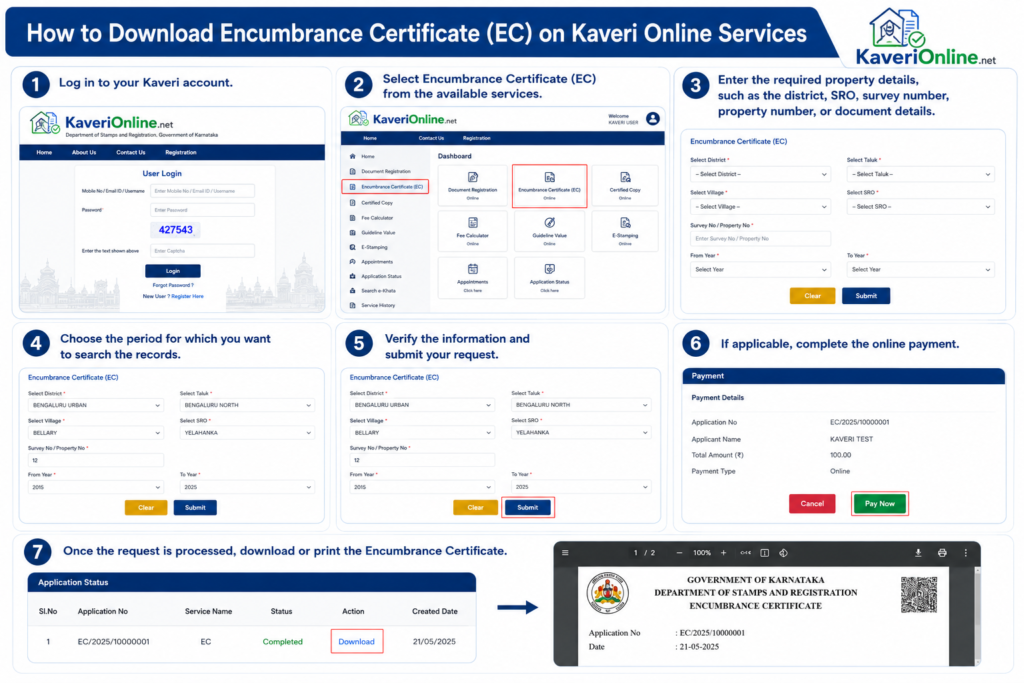
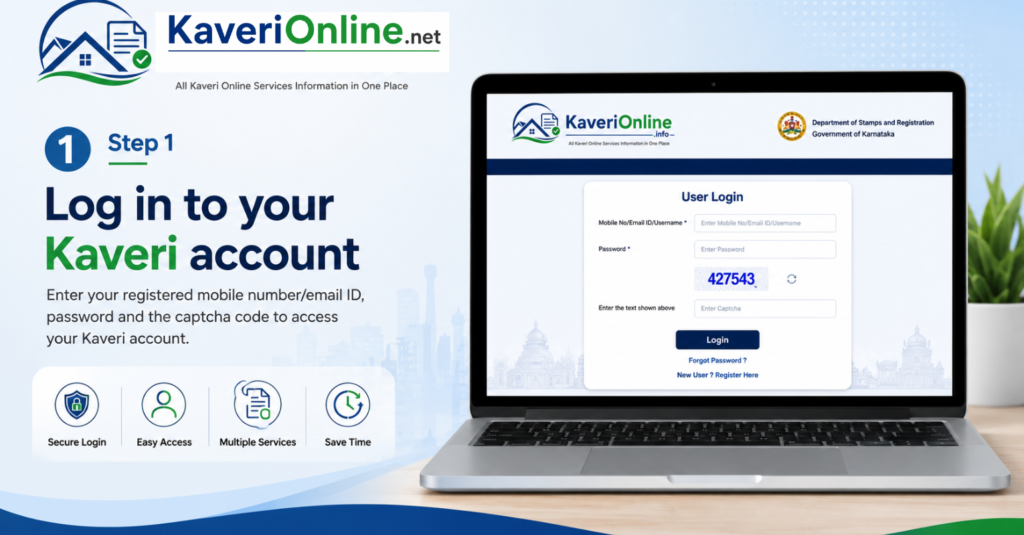
Step 1 – Log in to Your Kaveri Account
Access Your Dashboard
Visit the official Kaveri Online Services 2.0 portal and sign in using your registered mobile number or email address together with your password. After successful login, open your dashboard to access the Kaveri Online EC Download service and continue with your Encumbrance Certificate request.
💡 Important Tip
Always use the official Kaveri Online Services portal while requesting an Encumbrance Certificate (EC). Keep your registered mobile number active, as OTP verification may be required during login or while accessing certain services.
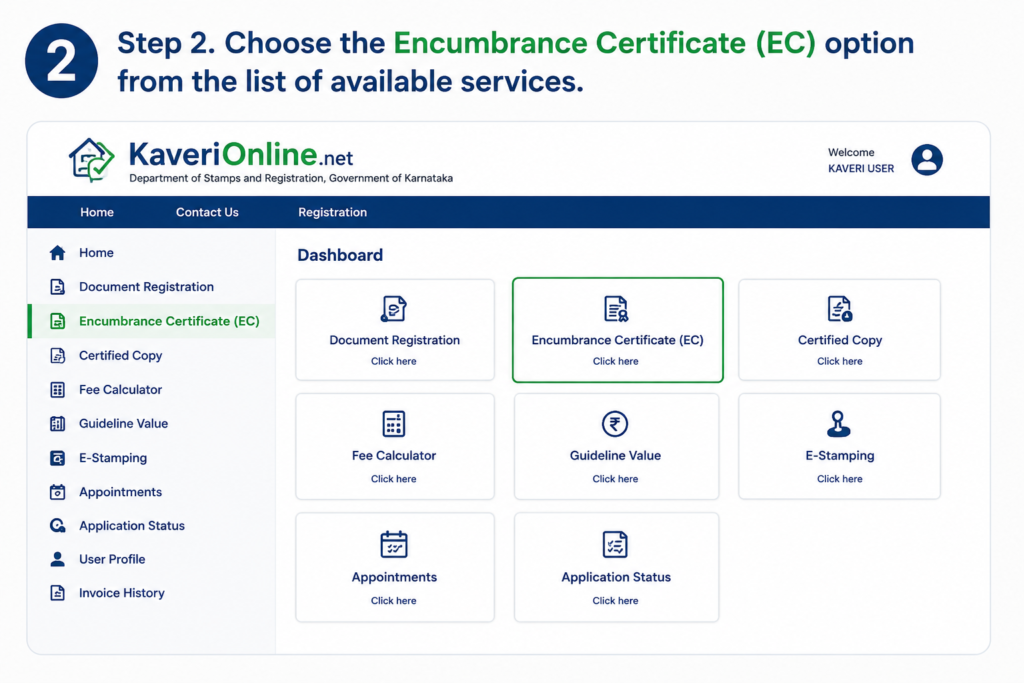
Step 2: Select the Encumbrance Certificate (EC) Service
After successfully logging in to your Kaveri Online Services account, navigate to your dashboard and select the Encumbrance Certificate (EC) service. This option allows you to search property records, submit an EC request, and download the certificate online whenever it is available.
Quick Tip
Make sure you choose the correct Encumbrance Certificate (EC) service from the dashboard before proceeding. Keep your property details ready to complete the search process quickly.
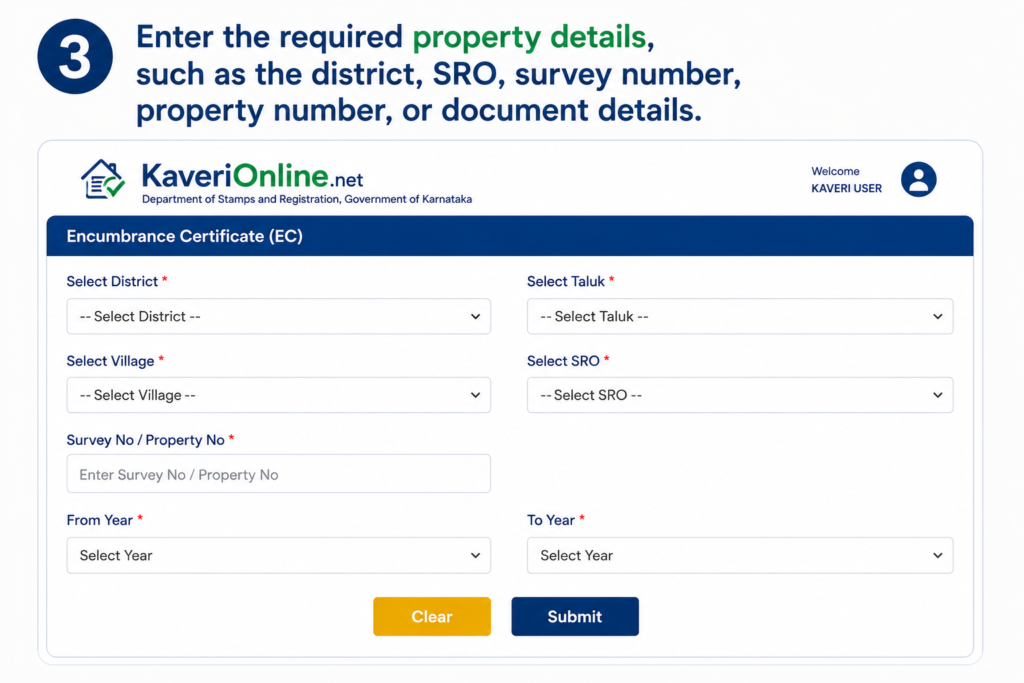
Step 3: Enter Property Details
Enter the required property information to search for the Encumbrance Certificate (EC). Depending on the available search options, you may need to provide details such as the District, Sub-Registrar Office (SRO), Survey Number, Property Number, or Document Number. Ensure that all information is entered accurately to retrieve the correct property records.
Helpful Tip
Verify all property details before submitting your search request. Entering the correct District, SRO, Survey Number, or Document Number will help you quickly locate the appropriate Encumbrance Certificate (EC) and avoid search errors.
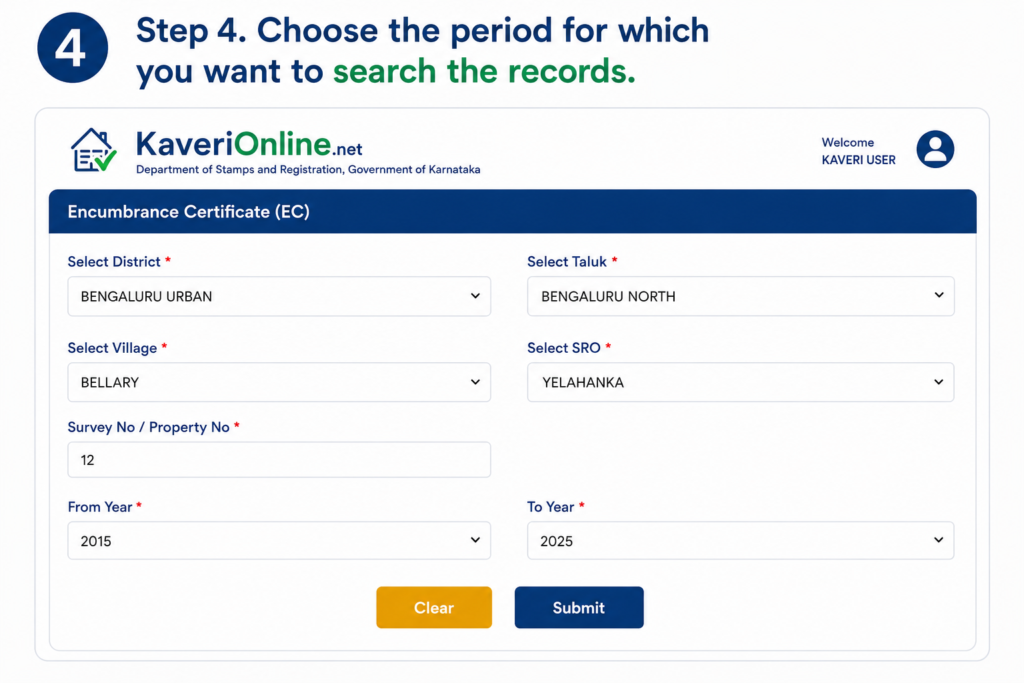
Step 4: Select the Search Period
Choose the date range or period for which you want to search the property's transaction records. The selected duration determines the registration details that will be included in your Encumbrance Certificate (EC). Make sure you select an appropriate time period based on your verification or documentation requirements.
Helpful Tip
Select a date range that covers the entire period of ownership or the years you wish to verify. Choosing the correct search period helps ensure that all relevant property transactions are included in the Encumbrance Certificate (EC).
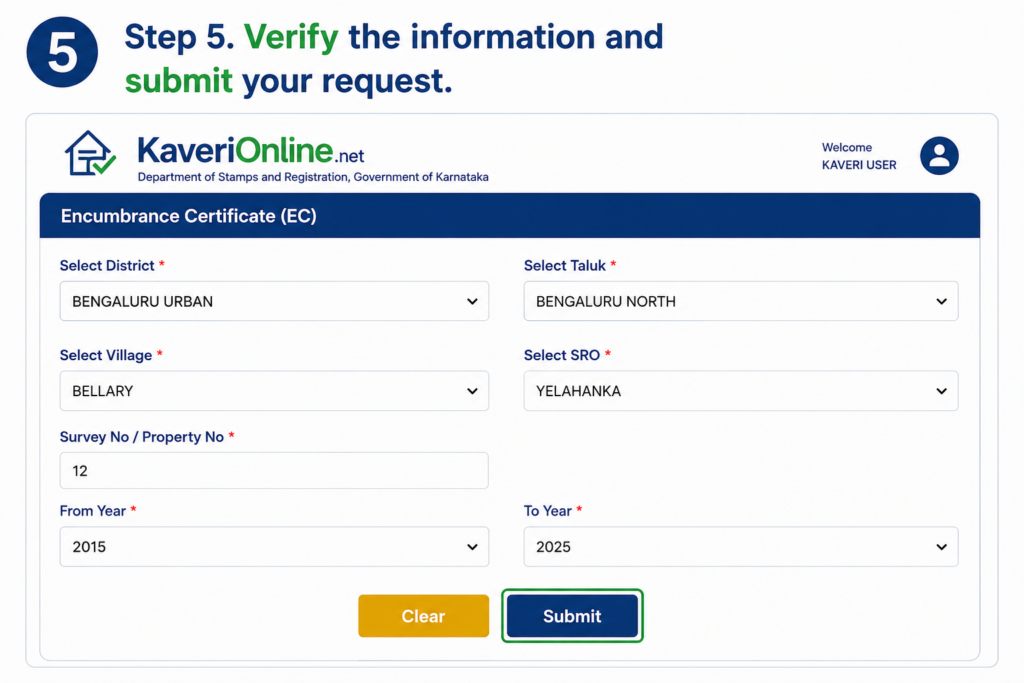
Step 5: Verify the Information and Submit Your Request
Carefully review all the property details you have entered, including the District, Sub-Registrar Office (SRO), Survey Number, Property Number, Document Number, and selected search period. After confirming that the information is accurate, click the Submit button to process your Kaveri Online EC request.
Verification Tip
Double-check all property details before submitting your request. Incorrect information may prevent the system from locating the correct property records or generating the appropriate Encumbrance Certificate (EC).
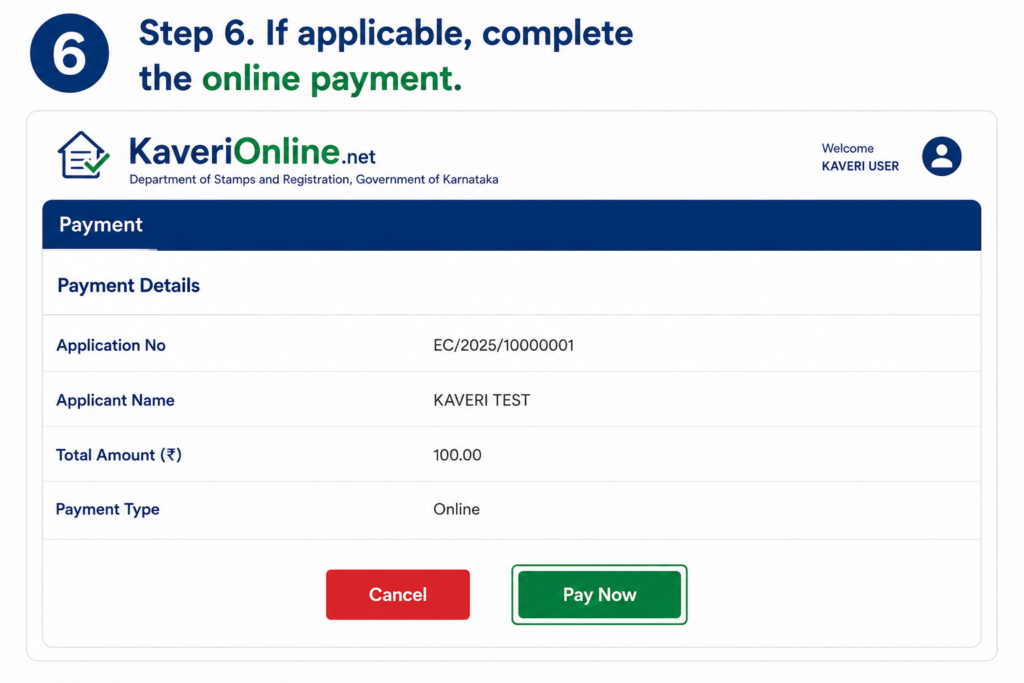
Step 6: Complete the Online Payment (If Applicable)
If an application fee is applicable for your requested Encumbrance Certificate (EC), proceed to the payment page and complete the transaction using one of the available online payment methods. After a successful payment, the portal will continue processing your request and generate a payment confirmation or transaction reference for future tracking.
Payment Tip
Keep your payment receipt or transaction reference number safe until your Encumbrance Certificate (EC) request is successfully processed. This information may be required for tracking your application or resolving any payment-related issues.
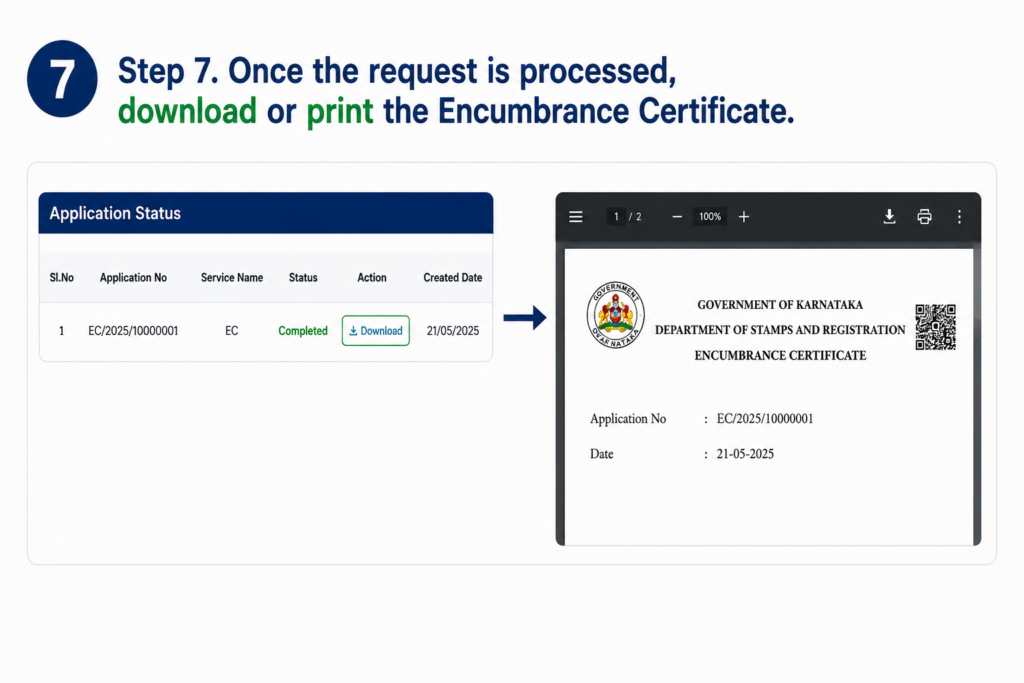
Step 7: Download or Print the Encumbrance Certificate (EC)
Once your request has been successfully processed, the Encumbrance Certificate (EC) will be available for download through the Kaveri Online Services Portal. You can download the certificate in PDF format or print a copy for property transactions, legal documentation, banking requirements, or future reference.
Download Tip
Save a digital copy of the Encumbrance Certificate (EC) and keep a printed copy if required. Verify all property details shown in the certificate before using it for registration, loan applications, or other legal purposes.
Tip: Always verify that you've entered the correct property details before submitting the request to avoid incorrect search results.
Property Registration Through Kaveri Online Services
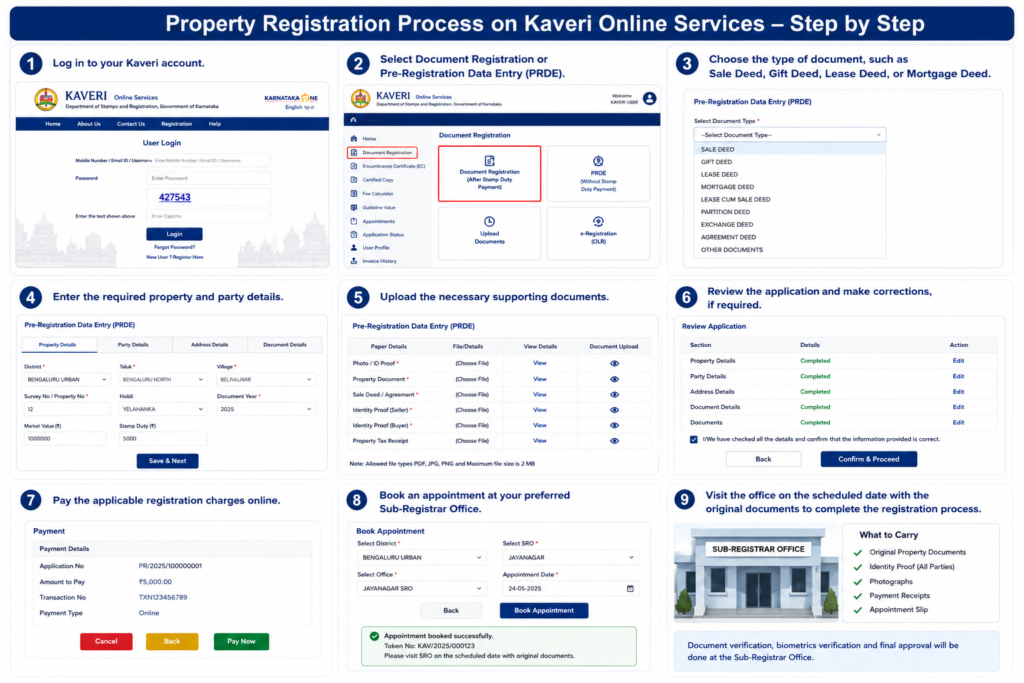
The Kaveri Online Services Portal allows citizens to begin the property registration process online, making registration faster, simpler, and more convenient. Users can prepare documents, enter property details, calculate registration fees, and schedule appointments before visiting the Sub-Registrar Office, helping reduce paperwork and save valuable time.
After completing Kaveri Online Login, registered users can access various digital property services through the Kaveri Online Services 2.0 platform. Although many registration activities can be completed online, the final registration generally requires all concerned parties to visit the designated Sub-Registrar Office for identity verification, document authentication, biometric verification, and completion of legal formalities as per government guidelines.
In addition to property registration, the portal also offers services such as Kaveri Online EC, Encumbrance Certificate (EC) Download, appointment booking, certified copies, guidance value search, and several other property-related facilities through a single secure platform.
Important Information
Online registration simplifies the documentation process, but the final registration is generally completed at the designated Sub-Registrar Office after successful identity verification and document validation.
Registration Highlights
Online Registration
Create property registration applications through the Kaveri Online Services Portal.
Document Preparation
Enter property details and prepare required registration documents online.
Appointment Booking
Schedule your visit to the Sub-Registrar Office for document verification.
Final Verification
Complete biometric verification and legal formalities at the designated registration office.
Digital Services
Access EC Download, Certified Copies, Guidance Value, Application Tracking, and other online services from one portal.
Important Information
Online registration simplifies the application process, but the final property registration generally requires all concerned parties to visit the designated Sub-Registrar Office (SRO) with the original documents for identity verification, document authentication, and completion of legal formalities.
Property Registration Process
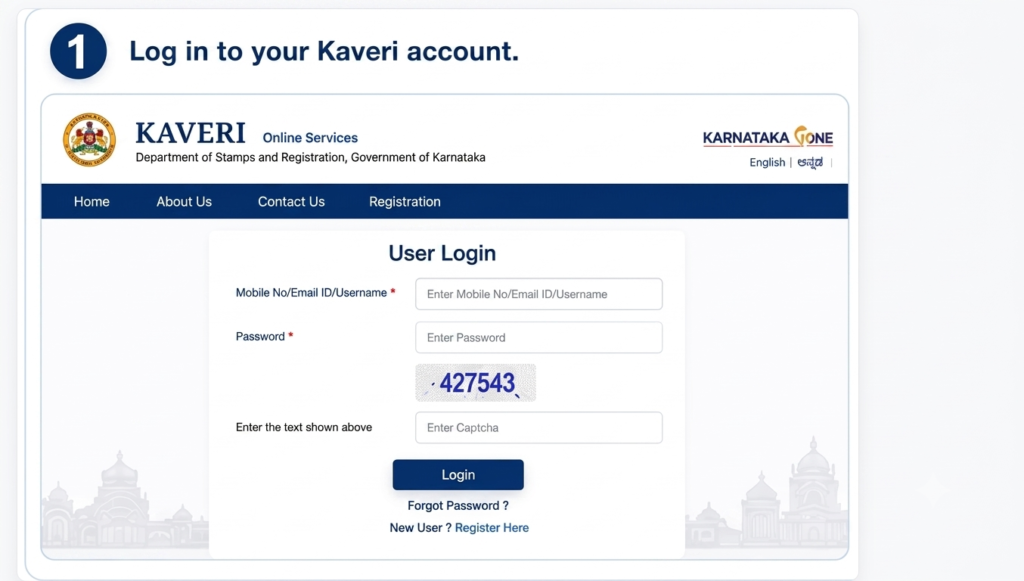
Step 1: Log In to Your Kaveri Account
Visit the official Kaveri Online Services Portal and sign in using your registered mobile number or email address along with your password. After successful login, you will be redirected to your dashboard, where you can access the Property Registration service and begin the online registration process.
Login Tip
Make sure your registered mobile number is active, as OTP verification may be required while signing in. If you cannot access your account, use the Forgot Password option to reset your login credentials before proceeding.
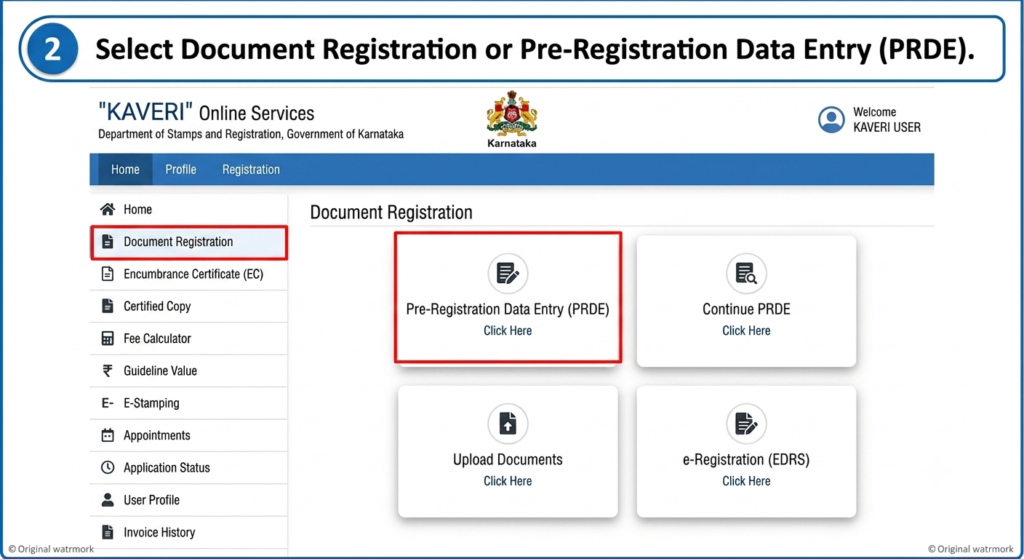
Step 2: Select Document Registration or Pre-Registration Data Entry (PRDE)
After logging in to your Kaveri Online Services account, navigate to your dashboard and select either Document Registration or Pre-Registration Data Entry (PRDE), depending on your registration requirements. The PRDE option allows you to enter property and document details in advance, making the final registration process at the Sub-Registrar Office faster and more efficient.
Helpful Tip
Choose the correct registration option based on your property transaction. Completing the Pre-Registration Data Entry (PRDE) carefully can significantly reduce processing time during your scheduled appointment at the Sub-Registrar Office.
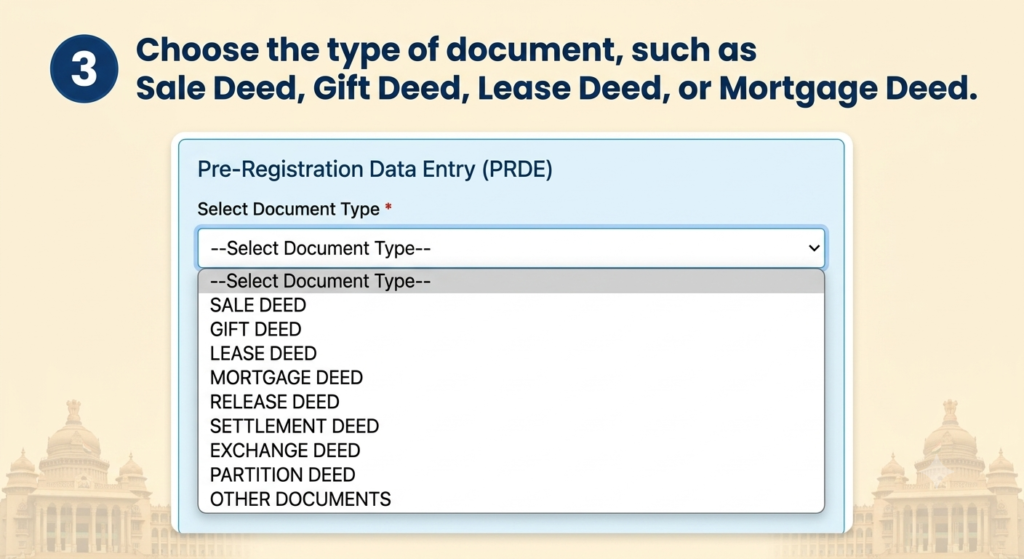
Step 3: Select the Document Type
Choose the appropriate document type for your property transaction from the available options on the Kaveri Online Services Portal. Depending on your requirement, you can select documents such as Sale Deed, Gift Deed, Lease Deed, Mortgage Deed, Partition Deed, or other supported registration documents. Selecting the correct document type ensures that the registration process follows the applicable legal requirements and fee structure.
Helpful Tip
Before selecting the document type, ensure that it matches the purpose of your property transaction. Choosing the correct deed helps prevent processing delays and ensures accurate registration under the applicable government guidelines.
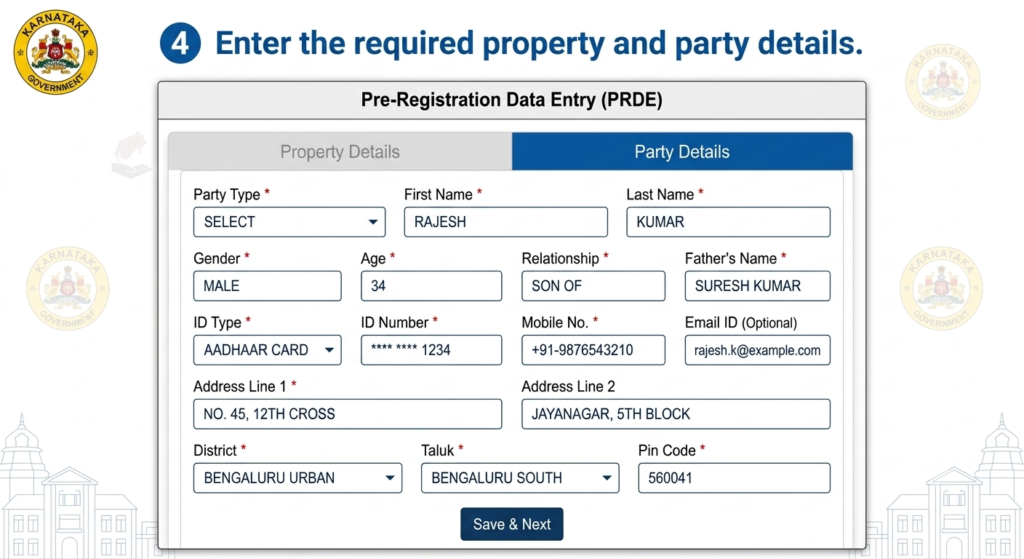
Step 4: Enter Property and Party Details
Enter all the required information related to the property and the parties involved in the transaction. This may include details such as the property address, survey number, schedule of property, buyer and seller information, identity details, and other information requested by the Kaveri Online Services Portal. Carefully review all entries to ensure they are accurate before proceeding to the next step.
Helpful Tip
Verify the names, identity details, survey number, and property information against the original documents before submission. Accurate information helps prevent application errors and delays during document verification at the Sub-Registrar Office.
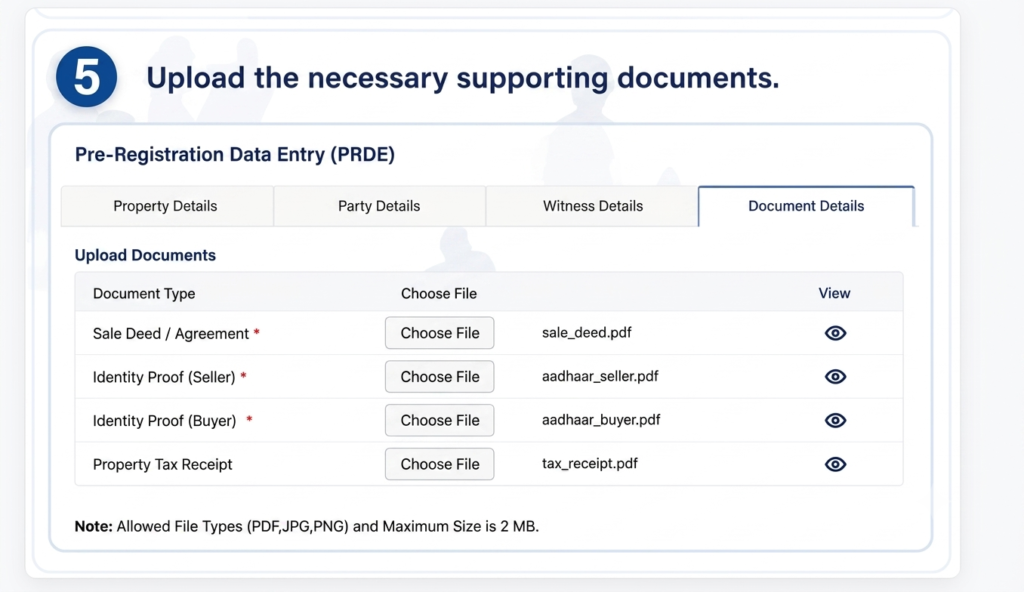
Step 5: Upload the Required Supporting Documents
Upload all the necessary supporting documents required for your property registration application. Depending on the type of transaction, you may need to provide documents such as the Sale Deed, identity proof, address proof, property-related documents, and any other supporting records requested by the Kaveri Online Services Portal. Ensure that the uploaded files are clear, complete, and meet the specified file format and size requirements.
Document Upload Tip
Before uploading, verify that all documents are legible, up to date, and correctly scanned. Keeping digital copies of the uploaded documents can be useful for future reference and during the final verification process at the Sub-Registrar Office.
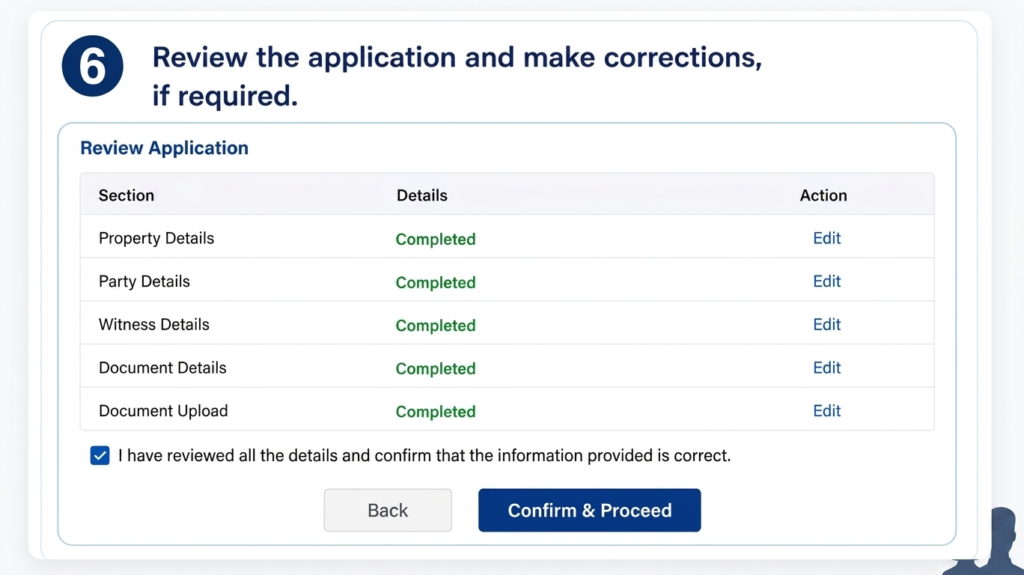
Step 6: Review the Application and Make Corrections
Carefully review all the information entered in your property registration application, including the property details, party information, selected document type, and uploaded supporting documents. If you notice any errors or missing information, make the necessary corrections before submitting the application. Ensuring that all details are accurate helps prevent delays during the verification and registration process.
Review Tip
Double-check names, survey numbers, property details, document information, and uploaded files before proceeding. Correcting mistakes at this stage can help avoid application rejection or delays during verification at the Sub-Registrar Office.
Step 7: Pay the Applicable Registration Charges Online
After reviewing your application, proceed to the payment section and pay the applicable registration fees, stamp duty, and other charges through the Kaveri Online Services Portal. The portal supports secure online payment methods, allowing you to complete the transaction safely. Once the payment is successful, a payment confirmation or transaction reference number will be generated for your records.
Payment Tip
Verify the payment amount before completing the transaction and save the payment receipt or reference number. This information may be required for tracking your application or during the final registration process at the Sub-Registrar Office.
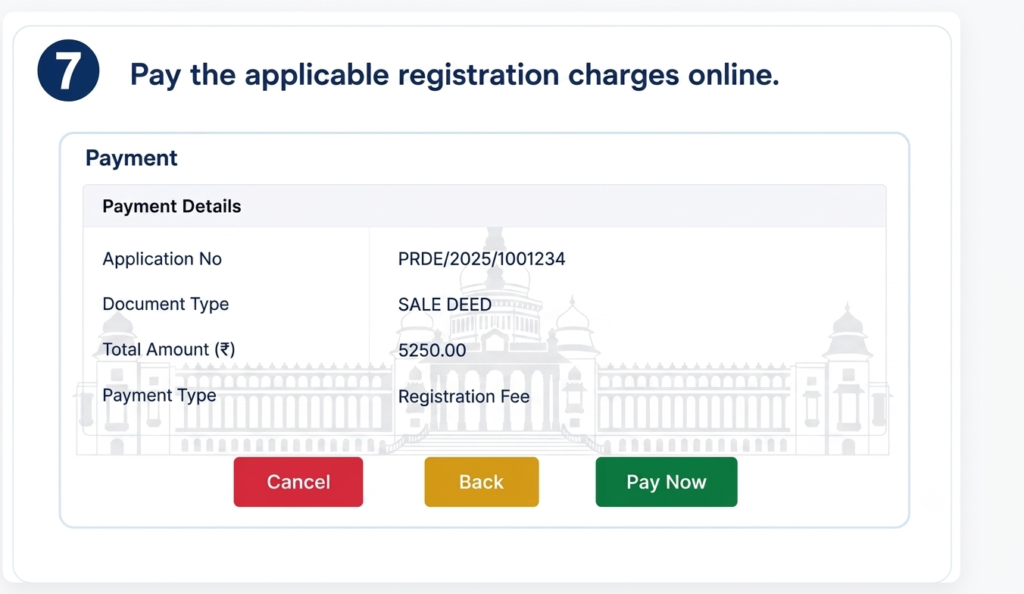
Step 7: Pay the Applicable Registration Charges Online
After reviewing your application, proceed to the payment section and pay the applicable registration fees, stamp duty, and other charges through the Kaveri Online Services Portal. The portal supports secure online payment methods, allowing you to complete the transaction safely. Once the payment is successful, a payment confirmation or transaction reference number will be generated for your records.
Payment Tip
Verify the payment amount before completing the transaction and save the payment receipt or reference number. This information may be required for tracking your application or during the final registration process at the Sub-Registrar Office.
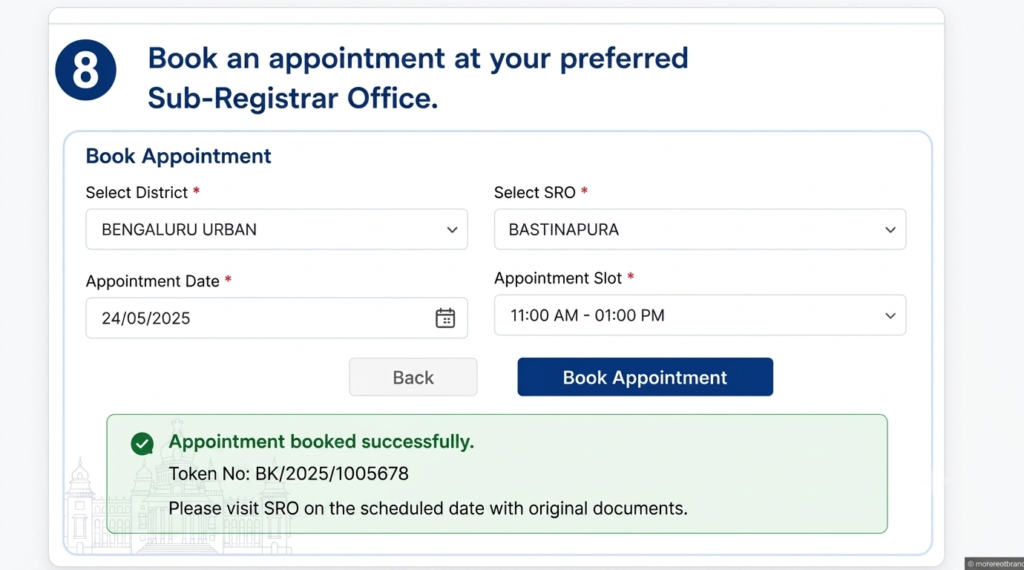
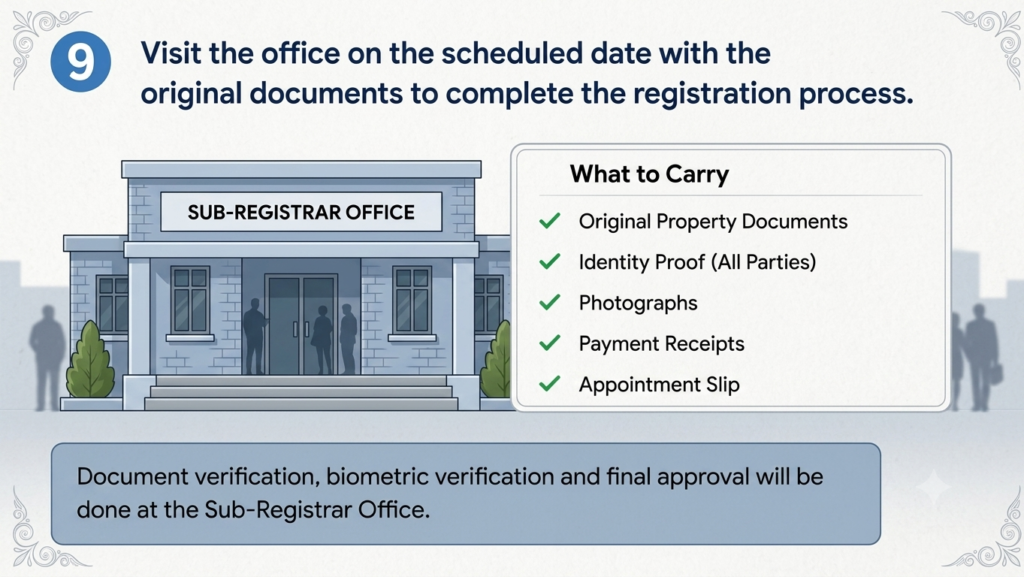
Step 8: Visit the Sub-Registrar Office to Complete Registration
On the scheduled appointment date, visit your selected Sub-Registrar Office (SRO) with all the original documents, valid identity proof, payment receipt, and appointment confirmation. During your visit, the concerned authorities will verify the documents, complete identity and biometric verification (where applicable), and finalize the property registration process in accordance with the Government of Karnataka's registration guidelines.
Final Registration Tip
Carry all original documents along with photocopies, valid photo identification, and your appointment confirmation. Arriving a few minutes early can help complete the verification and registration process smoothly without unnecessary delays.